
Human Expert Feedback System#
TOU validation and deployment status (2026-08-16)#
A clean Python 3.12.3 install, loopback discovery of all five MCP tools, a complete two-client synthetic request/response lifecycle, and the Flask companion health endpoint passed. Public publication, independent-identity authorization, production WSGI deployment, retention/consent procedures, concurrency, and resource measurements remain incomplete; keep this deployment private. Authenticated private Platform import and owner testing passed on 2026-08-16; public publication and independent-caller authorization/isolation remain untested.
Operations:
consult_human_expert,get_expert_response,list_pending_expert_requests,submit_expert_response,get_expert_statusStart:
python -m tooluniverse.remote.expert_feedback.human_expert_mcp_tools --start-server --port 9876Endpoint:
http://127.0.0.1:9876/mcp(companion HTTP service:127.0.0.1:9877; health:http://127.0.0.1:9877/health)Provider configuration: non-loopback MCP/API/web binding requires
TOOLUNIVERSE_API_TOKEN. Define retention, consent, authorization, staffing, and production WSGI procedures before deployment.TOU check:
tu doctor --forward http://127.0.0.1:9876/mcp --jsonPrivate relay:
tu serve --share --forward http://127.0.0.1:9876/mcp --name validation-expert-feedback --workers 2
Non-loopback binding requires TOOLUNIVERSE_API_TOKEN; otherwise keep the server on loopback. The relay requires TOOLUNIVERSE_SERVICE_KEY. Public publication and independent-identity testing were not run.
New-user check: python scripts/remote_validation/setup_skill_preflight.py --implementation expert-feedback. Add --check-provider-env before launch, --live after launch, and --check-connect-prereqs before sharing. Live preflight checks exact MCP discovery only; it does not run or validate a model. The pinned relay SDK is not on PyPI and currently requires authorized GitHub repository access plus a configured SSH key, so a working local MCP server does not by itself prove that a new operator can share it.
The authenticated 2026-08-16 Platform matrix found all 30 private owner relays online and all 41 operations discoverable. This implementation was imported as unpublished owner draft(s), configured with a 120-second timeout, and invoked through /expert-sessions/{id}/test. Across the set, 38 unique operations passed return-schema and semantic validation; the three USPTO operations returned exact provider HTTP 403 and remain credential-blocked. Public publication, independent-caller authorization/isolation, broad saturation, and persistent supervision were not tested.
📖 Overview#
The Human Expert Feedback System is a sophisticated human-in-the-loop consultation platform designed for ToolUniverse. It enables AI systems to seamlessly consult with human experts when encountering complex decisions, particularly in medical and scientific domains where expert knowledge is crucial.
🎯 Key Capabilities#
🔄 Real-time Consultation: Submit questions to human experts and receive responses in real-time
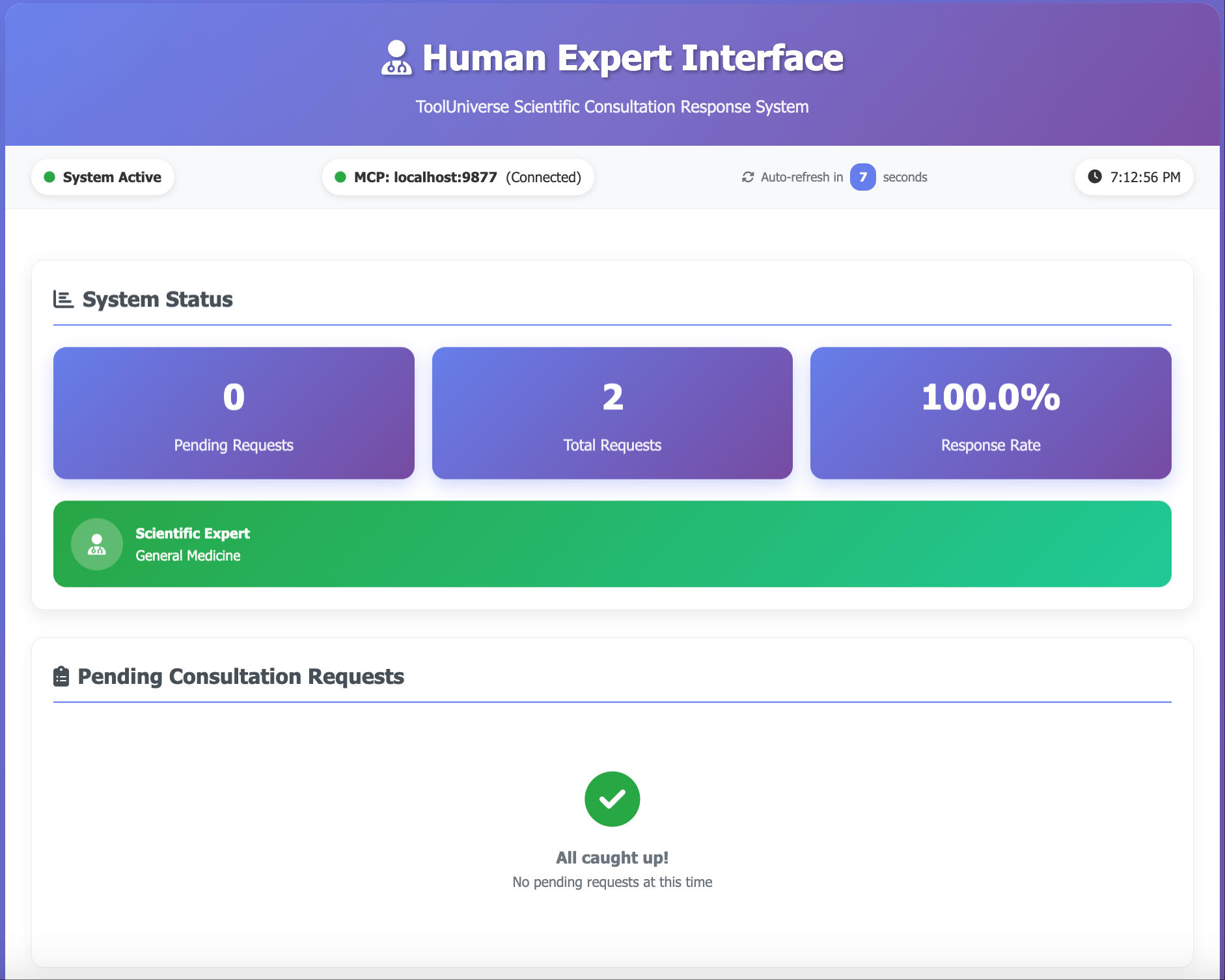
🌐 Modern Web Interface: Beautiful, responsive dashboard with auto-refresh for expert interactions
⚡ MCP Integration: Built on Model Context Protocol for seamless ToolUniverse integration
🎨 Priority Management: Support for normal, high, and urgent priority requests with visual indicators
📱 Multi-Interface: Web-based and terminal-based interfaces for different user preferences
🔌 Flexible Deployment: Auto-port discovery and custom configuration options
🩺 Use Cases#
Medical AI: Get expert medical opinions for complex patient cases
Scientific Research: Consult domain experts for research methodology and analysis
Drug Discovery: Expert review of molecular compounds and drug interactions
Clinical Decision Support: Real-time consultation for treatment recommendations
Research Validation: Expert validation of AI-generated hypotheses and findings
🚀 Quick Start#
Install Package#
pip install tooluniverse
Start Expert Feedback Server#
tooluniverse-expert-feedback --start-server
# This starts:
# 🔌 Router-ToolUniverse Server on port 9876 (for ToolUniverse)
# � Router-Expert Server on port 9877 (for Expert Web Interface)
Start Web Interface (On Expert Side)#
# Interactive setup - will prompt for API server details
tooluniverse-expert-feedback-web

# Alternative: Use environment variables (for automation)
export EXPERT_FEEDBACK_API_HOST="192.168.1.100"  # API Server IP
export EXPERT_FEEDBACK_API_PORT="9877"           # API Server port
tooluniverse-expert-feedback-web
Interactive Setup Process:
Run
tooluniverse-expert-feedback-webEnter Router-Expert server IP (or press Enter for localhost)
Enter Router-Expert server port (or press Enter for 9877)
Web interface opens automatically at http://localhost:8090
🏗️ Architecture#
Dual Server Design:
Router-ToolUniverse Server (Port 9876): Handles ToolUniverse tool calls
Router-Expert Server (Port 9877): Handles expert web interface communication
Shared Data: Both servers access the same expert system instance
💻 Usage in ToolUniverse#
Set Environment Variable:
In the environment where agent runs tools:
export EXPERT_FEEDBACK_MCP_SERVER_URL="localhost:9876" # Use actual MCP port
from tooluniverse import ToolUniverse

tooluni = ToolUniverse()
tooluni.load_tools()

# Submit question to expert
result = tooluni.run({
    "name": "expert_consult_human_expert",
    "arguments": {
        "question": "What is the recommended dosage of aspirin for elderly patients?",
        "specialty": "cardiology",
        "priority": "high"  # normal, high, urgent
    }
})
🔧 Available Tools#
Tool |
Purpose |
|---|---|
|
Submit questions to experts |
|
Check for expert responses |
|
View pending requests |
|
Submit expert responses |
|
Get system status |
⚙️ Command Options#
# Start server (auto port)
tooluniverse-expert-feedback --start-server

# Start server (fixed port)
tooluniverse-expert-feedback --start-server --port 8000

# Interactive web interface for experts
tooluniverse-expert-feedback-web
📁 Files#
tooluniverse-expert-feedback- Router servertooluniverse-expert-feedback-web- Launcher Router-Expert with auto-detectionsimple_test.py- Basic test script
🎨 Web Interface Features#
Modern UI: Gradient backgrounds, card layouts, responsive design
Auto-refresh: 15-second updates with countdown timer
Priority colors: Normal (blue), High (orange), Urgent (red + animation)
Real-time notifications: Toast messages for user actions
Mobile-friendly: Works on all screen sizes
🧑⚕️ Built for professionals and AI systems